How to Connect RevenueCat to Apple Search Ads for Keyword-Level ROAS
A step-by-step guide to joining RevenueCat subscription revenue with Apple Search Ads spend, so you can see true ROAS down to the keyword.
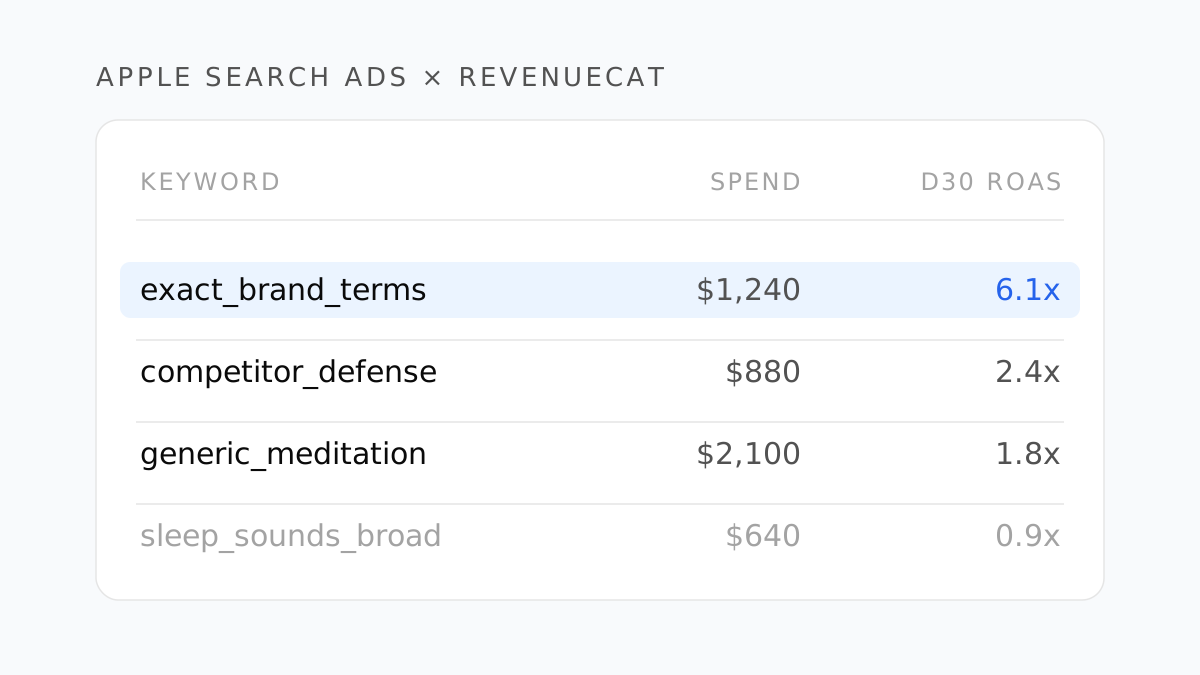
Apple Search Ads tells you what you spent and how many installs you bought. RevenueCat tells you what those users paid you. Neither one, on its own, tells you whether keyword meditation app made money.
This guide connects the two. By the end you'll have campaign, ad group, and keyword IDs attached to every subscriber in RevenueCat — and a ROAS number per keyword that survives the trial delay and the App Store's 15–30% cut.
What each side actually knows
The gap is worth naming precisely, because it explains why the setup has the shape it does.
Apple Search Ads knows: impressions, taps, installs, cost — broken out by campaign, ad group, and keyword. It also reports conversions if you've configured them, but those are install-shaped. A subscription that starts on day 7 and converts to paid on day 14 is invisible.
RevenueCat knows: trials, conversions, renewals, refunds, and realized revenue per customer — with none of it attributed to a keyword unless you send the attribution data yourself.
The join key is Apple's AdServices attribution token: a device-level token that identifies which ad drove the install. It doesn't require an ATT prompt, which is why it survives where IDFA-based attribution doesn't.
Step 1: Collect the AdServices token in the app
Update to iOS SDK 4.10.0 or later, then add one line after Purchases.configure:
Purchases.configure(withAPIKey: "your_api_key")
Purchases.shared.attribution.enableAdServicesAttributionTokenCollection()
That's the whole client-side change. The SDK fetches AAAttribution.attributionToken() and ships it to RevenueCat, which then queries Apple directly for the attribution payload within a 24-hour window.
Cross-platform equivalents exist: react-native-purchases 5.0.0-beta.4, purchases-flutter 4.1.0, and cordova-plugin-purchases 3.0.0-rc.5 and up. Check the RevenueCat Apple Search Ads docs for the current minimums before you ship.
Step 2: Understand what comes back
Apple's response populates customer attributes on the RevenueCat side. The fields that matter for ROAS:
| Field | What it is |
|---|---|
campaignId | Numeric ID of the ASA campaign |
adGroupId | Numeric ID of the ad group |
keywordId | Numeric ID of the keyword that triggered the tap |
countryOrRegion | Storefront of the install |
conversionType | New download vs. redownload |
Note what's missing: the keyword text. You get keywordId, not meditation app. Resolving IDs to readable names requires the Apple Ads Campaign Management API — which is also where your spend numbers live, so you need that connection anyway.
This is the step most teams underestimate. A keyword-level ROAS report is a three-way join: RevenueCat revenue → attribution IDs → Apple Ads API for spend and names.
Step 3: Pick your revenue definition before you calculate anything
RevenueCat reports two different numbers, and using the wrong one will make every keyword look 30% better than it is.
- Revenue — gross, minus refunds from transactions in the period.
- Proceeds — revenue minus estimated store commission and taxes.
Apple takes 30% (15% on the Small Business Program, and on subscriptions after year one). Taxes vary by storefront. If you compute ROAS on gross revenue against real spend, you are measuring a number your bank account will never see.
In the webhook payload you can derive it directly:
proceeds = price * (1 - tax_percentage - commission_percentage)
For integrations that push revenue outward, RevenueCat also exposes a Sales reporting mode — Revenue after store commission, or after store commission and taxes. Set it once, and make sure every downstream tool reads the same mode. Half of all "my dashboards disagree" tickets are two tools on two different modes.
Step 4: Choose the window that matches your funnel
A subscription app with a 7-day trial has no revenue on D0. Judging a keyword on day-one ROAS will pause every keyword you have.
Pick the window from your own conversion curve:
- 7-day trial, monthly plan → judge on D30 realized revenue at the earliest.
- No trial, monthly plan → D7 is usable as a directional signal, D30 for decisions.
- Annual plans in the mix → D30 still under-counts. Use D30 to rank keywords against each other, and a D90 or D180 cohort to set the absolute bar.
The mechanics of building that cohort view are covered in our piece on D30 realized LTV.
Window in which Apple returns attribution data after the token is submitted
RevenueCat, Apple Search Ads integration docs
Step 5: Read the report like a UA manager
Once spend and realized revenue sit in the same table, the decisions get boring in a good way:
- Brand exact terms almost always show the highest ROAS. They're also partly cannibalizing organic installs. Don't scale them on ROAS alone — scale them enough to defend the listing.
- Competitor terms run lower ROAS with better incrementality. Judge them on a separate bar.
- Discovery / broad match is where you find new keywords and where you waste money. Harvest winners into exact, negative out the rest, weekly.
- A keyword with 4 conversions is not a signal. Set a minimum conversion threshold before you let ROAS drive a decision, or you'll spend your quarter chasing noise.
Three things that will break your numbers
Redownloads counted as new installs. conversionType distinguishes them. If you don't filter, returning users inflate ROAS on brand terms specifically.
Trial starts treated as revenue. A trial start is a cost, not a conversion. Only count the paid conversion, on the date it actually converts — not the date the trial began.
Refunds attributed to the wrong period. RevenueCat nets refunds against the transaction period. If your spend table is keyed to install date and your revenue to transaction date, the two drift. Anchor both to the cohort's install date.
- One SDK line — enableAdServicesAttributionTokenCollection() — puts campaign, ad group, and keyword IDs on every RevenueCat customer.
- You still need the Apple Ads API to resolve keyword IDs to names and to pull spend.
- Decide gross vs. proceeds before calculating; a 30% store cut is the difference between a winner and a loser.
- Match the ROAS window to your trial length — D0 ROAS on a 7-day trial is always zero.
- Set a minimum conversion count before letting a keyword's ROAS drive a pause or scale decision.
Where this stops scaling
This works cleanly for one network. The moment you add Meta, Google UAC, and TikTok, you're maintaining four attribution paths, four spend exports, and one revenue source that has to be reconciled against all of them — and the store-commission question has to be answered identically in every one.
That's the problem Roasy was built for: every network's spend and your RevenueCat cohorts on one screen, with the same revenue definition applied everywhere. If you're already running the spreadsheet version of this, you know exactly how long it takes every Monday morning.
For the wider version of this measurement problem, see why platform-reported ROAS and your real numbers never match.
Berk Aydın
Performance Marketing Lead at Roasy. Writes about ROAS, retention, and the messy economics of mobile UA.